
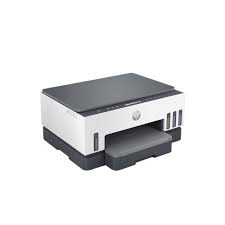


HP SMART TANK 720 WIRELESS ALL-IN-ONE
₦450,000.00
HP Smart Tank 720 Wireless All-in-One
The HP SMART TANK 720 WIRELESS ALL-IN-ONE delivers high-quality printing, scanning, and copying with ultra-low-cost ink. Featuring reliable wireless connectivity, smart guided buttons, and a spill-free refill system, it’s built for seamless performance and high-volume printing at home or in the office.
Size and packaging guidelines

Fermentum scelerisque hendrerit parturient nullam enim lobortis litora parturient dictumst.

Potenti a quisque tincidunt venenatis adipiscing parturient fermentum nisl tincidunt amentu.

Scelerisque conubia lobortis a condimentum ad eleifend dui integer maecenas habitant nostra.
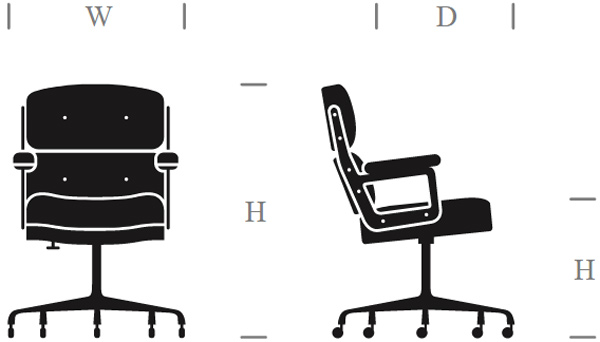
| Specification | Chair | Armchair | Sofas |
| Height | 37" | 42" | 42" |
| Width | 26.5" | 32.5" | 142" |
| Depth | 19.5" | 22.5" | 24.5" |
| Assembly Required | No | No | Yes |
| Packaging Type | Box | Box | Box |
| Package Weight | 55 lbs. | 64 lbs. | 180 lbs. |
| Packaging Dimensions | 27" x 26" x 39" | 45" x 35" x 24" | 46" x 142" x 25" |
HP SMART TANK 720 WIRELESS ALL-IN-ONE
Functions
Print, scan, copy, wireless
Print speed black (ISO)
Up to 15 ppm 1
Print speed black (draft, A4)
Up to 23 ppm 1
Print speed black (ISO, A4)
Up to 15 ppm 1
Print speed color (ISO)
Up to 9 ppm 1
Print speed color (draft, A4)
Up to 22 ppm 1
Print Speed Color (ISO)
Up to 9 ppm 1
First page out black (letter, ready)
First page out black (A4, ready)
As fast as 14 sec
First page out color (letter, ready)
First page out color (A4, ready)
As fast as 16 sec
Duplex printing
Automatic
Duty cycle (monthly, letter)
Up to 5,000 pages up to 5,000 pages (Duty cycle is the maximum number of pages that can be printed in a month, but this page volume is not recommended on an ongoing basis.)
Duty cycle (monthly, A4)
Up to 5,000 pages (Duty cycle is the maximum number of pages that can be printed in a month, but this page volume is not recommended on an ongoing basis.)
Recommended monthly page volume
400 to 800 (HP recommends the number of pages printed not exceed the recommended monthly page volume for optimum device performance.)
Print quality black (best)
Up to 1200 x 1200 rendered dpi
Print quality color (best)
Up to 4800 x 1200 optimized dpi color when printing from a computer and 1200 input dpi
Print languages
HP PCL 3 GUI
Print technology
HP Thermal Inkjet
Connectivity, standard
1 Wi-Fi Direct; 2 Hi-Speed USB 2.0 (device)
Mobile printing capability
Apple Air Print; Mopria Print Service; HP Print Service Plugin (Android printing); HP app; Wi-Fi® Direct Printing 2
Network capabilities
Yes, via built-in Wi-Fi
Wireless capability
Yes, 2.4/5G dual band Wi-Fi, Wi-Fi Direct
Wireless technologies
802.11a/b/g/n/ac; Wi-Fi®
Minimum System Requirements for Macintosh
macOS v10.14 Mojave, macOS v10.15 Catalina, macOS v11 Big Sur; 2 GB HD; Internet required
Minimum System Requirements
Windows 10, 7: 32-bit or 64-bit, 2 GB available hard disk space, Internet connection, Internet Explorer.
Display
TN, Reflective, Positive LCD 70 x 12mm
Processor speed
800 MHz
Maximum Memory
128 MB
Memory
128 MB
Compatible Operating Systems
Windows 11; Windows 10; Windows 7; macOS 10.14 Mojave; macOS 10.15 Catalina; macOS 11 Big Sur; macOS 12 Monterey; macOS 13 Ventura; macOS 14 Sonoma (Windows10, 7: 32-bit or 64-bit; macOS v10.14 Mojave, macOS v10.15 Catalina, macOS v11 Big Sur; 2 GB available hard disk space, Internet connection, Internet Explorer.)
Paper handling input, standard
250-sheet input tray
Paper handling output, standard
100-sheet output tray
Media types
Plain Paper, HP Photo Papers, HP Matte Brochure or Professional Paper, HP Matte Presentation Paper, HP Glossy Brochure or Professional Paper, Other Photo Inkjet Papers, Other Matte Inkjet Papers, Other Glossy Inkjet Papers, Light/Recycled
Media sizes supported
A4; A5; A6; B5 (JIS); Envelope (DL, C5, C6, Chou #3, Chou #4); Card (Hagaki, Ofuku Hagaki)
Media sizes, custom
88.9 x 127 mm to 215.9 x 355.6 mm
Borderless printing
Yes (up to 8.5 x 11 in, 210 x 297 mm)
Media weight, recommended
60 to 105 g/m²
File Format Supported
PDF; BMP; PNG; TIF; JPG
Scanner type
Flatbed only
Scan file format
JPG; PDF; PNG; TIFF
Enhanced scanning resolution
Up to 1200 dpi
Scan resolution, optical
Up to 1200 dpi
Scan resolution, hardware
Up to 1200 x 1200 dpi
Scan size, maximum
216 x 297 mm
Scan technology
Contact Image Sensor (CIS)
Copy speed black (ISO)
Up to 13 cpm 3
Copy speed color (ISO)
Up to 6 cpm 3
Copy resolution (black text)
Up to 600 dpi
Copy resolution (color text and graphics)
Up to 600 x 600 dpi
Copy resolution (black graphics)
Up to 600 dpi
Copies, maximum
Up to 99 copies
Copy reduce / enlarge settings
25 to 400%
Copier settings
Number of Copies, Resize, Quality, Lighter/Darker, Papersize, Papertype, ID Copy
Power consumption
0.10 Watts (Off Mode), 2.00 Watts ( Sleep mode) 4
Power
Input voltage: 100 to 240 VAC (+/- 10%), 50/60 Hz (+/- 3 Hz)
Operating humidity range
15 to 80% RH (non-condensing)
Recommended operating humidity range
20 to 80% RH
Non-Operating Humidity Range
5 to 90% RH (non-condensing)
Operating temperature range
5 to 40°C
Operating temperature range
41 to 104°F
Dimensions (W x D x H)
42.75 x 36.40 x 19.86 cm 5
Maximum dimensions (W x D x H)
427.54 x 440.73 x 198.55 mm 5
Weight
6.38 kg
Replacement cartridges
HP GT53 90-ml Black bottle (~4000 pages); HP 53XL 135-ml Black bottle (~6000 pages); HP GT52 70-ml Cyan bottle (~8000 pages); HP GT52 70-ml Magenta bottle (~8000 pages); HP GT52 70-ml Yellow bottle (~8000 pages


Related products


HP COLOR LASERJET PRO M454DW


HP COLOR LASERJET PRO MFP M183FW


HP LASERJET PRO MFP 4103DW


HP LASERJET PRO MFP 4103FDN

HP OFFICE JET PRO 9013 WIDE FORMAT

HP SMART TANK 530 WIRELESS ALL-IN-ONE

HP SMART TANK 790 WIRELESS ALL-IN-ONE
Print smarter with the HP SMART TANK 790 WIRELESS ALL-IN-ONE – the perfect all-in-one for high-volume printing. Enjoy crisp, vibrant prints at ultra-low cost with refillable ink tanks, lightning-fast print speeds, wireless printing, and a sleek, modern design. Ideal for home offices and small businesses.




Reviews
There are no reviews yet.