
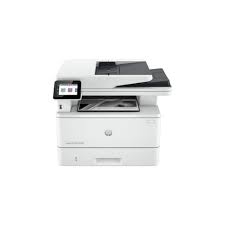
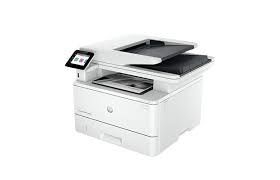


HP LASERJET PRO MFP 4103FDN
₦655,000.00
HP LASERJET PRO MFP 4103FDN
Boost office efficiency with the HP LASERJET PRO MFP 4103FDN — a compact powerhouse engineered for busy teams of up to 10 users. This all-in-one monochrome printer delivers blazing-fast output—up to 42 ppm (letter) / 40 ppm (A4) with documents ready in ~6 seconds—and supports duplex printing, scanning, copying, and faxing via its built-in ADF
Features include a 2.7″ color touchscreen, single-pass duplex scanning at 46 ipm (mono)/34 ipm (color), and smart shortcuts through the HP Smart App, streamlining workflows at every step
. With a robust monthly duty cycle of 80,000 pages and sustainable EcoSmart toner, it handles high-volume demands while minimizing energy use
✔ Core Benefits:
High-speed monochrome printing — up to 42 ppm with first-page output in 6.1–6.3 seconds
All-in-one versatility — print, scan, copy, fax—and duplex ADF for fast, two-sided scanning
Enhanced usability — easy-to-navigate touchscreen, mobile-ready with AirPrint/Mopria/HP Smart
Enterprise-class reliability — 512 MB RAM, 1200 MHz processor, Gigabit Ethernet
Energy-efficient design — EcoSmart toner and HP Wolf Pro Security for safe, sustainable use
Perfect for small to mid-size offices needing fast, reliable horsepower in a space-saving design.
Size and packaging guidelines

Fermentum scelerisque hendrerit parturient nullam enim lobortis litora parturient dictumst.
Potenti a quisque tincidunt venenatis adipiscing parturient fermentum nisl tincidunt amentu.

Scelerisque conubia lobortis a condimentum ad eleifend dui integer maecenas habitant nostra.
| Specification | Chair | Armchair | Sofas |
| Height | 37" | 42" | 42" |
| Width | 26.5" | 32.5" | 142" |
| Depth | 19.5" | 22.5" | 24.5" |
| Assembly Required | No | No | Yes |
| Packaging Type | Box | Box | Box |
| Package Weight | 55 lbs. | 64 lbs. | 180 lbs. |
| Packaging Dimensions | 27" x 26" x 39" | 45" x 35" x 24" | 46" x 142" x 25" |
HP LASERJET PRO MFP 4103FDN
Functions
Print, copy, scan, fax
Print speed black (ISO, letter)
Up to 42 ppm 1
Print speed black (ISO, A4)
Up to 40 ppm 1
First page out black (letter, ready)
As fast as 6.1 sec 2 ( Measured using ISO/IEC 17629. For more information see http://www.hp.com/go/printerclaims. Exact speed varies depending on the system configuration, software application, driver, and document complexity.)
First page out black (A4, ready)
As fast as 6.3 sec 2 ( Measured using ISO/IEC 17629. For more information see http://www.hp.com/go/printerclaims. Exact speed varies depending on the system configuration, software application, driver, and document complexity.)
First page out color (letter, ready)
2 ( Measured using ISO/IEC 17629. For more information see http://www.hp.com/go/printerclaims. Exact speed varies depending on the system configuration, software application, driver, and document complexity.)
First page out color (A4, ready)
2 ( Measured using ISO/IEC 17629. For more information see http://www.hp.com/go/printerclaims. Exact speed varies depending on the system configuration, software application, driver, and document complexity.)
Duplex printing
Automatic (default)
Duty cycle (monthly, letter)
Up to 80,000 pagesUp to 80,000 pages (Duty cycle is defined as the maximum number of pages per month of imaged output. This value provides a comparison of product robustness in relation to other HP LaserJet or HP Color LaserJet devices, and enables appropriate deployment of printers and MFPs to satisfy the demands of connected individuals or groups.)
Duty cycle (monthly, A4)
Up to 80,000 pages (Duty cycle is defined as the maximum number of pages per month of imaged output. This value provides a comparison of product robustness in relation to other HP LaserJet or HP Color LaserJet devices, and enables appropriate deployment of printers and MFPs to satisfy the demands of connected individuals or groups.)
Recommended monthly page volume
750 to 4,000 (HP recommends that the number of printed pages per month be within the stated range for optimum device performance, based on factors including supplies replacement intervals and device life over an extended warranty period.)
Print quality black (best)
Fine Lines (1200 x 1200 dpi)
Print languages
HP PCL 6, HP PCL 5e, HP postscript level 3 emulation, PDF, URF, Native Office, PWG Raster
Print technology
Laser
Connectivity, standard
1 Hi-Speed USB 2.0; 1 rear host USB; 1 Front USB port; Gigabit Ethernet 10/100/1000BASE-T network; 802.3az(EEE)
Mobile printing capability
Apple AirPrint™; Mopria™ certified; HP app
Network capabilities
Yes, via built-in 10/100Base-TX Ethernet, Gigabit; Auto-crossover Ethernet; Authentication via 802.1X
Minimum System Requirements for Macintosh
2 GB available hard drive space; Internet connection or USB port; Internet browser. For additional OS hardware requirements see apple.com;
Minimum System Requirements
2 GB available hard disk space; Internet connection or USB port; Internet browser. For additional OS hardware requirements see microsoft.com;
Display
2.7″ (6.86 cm) intuitive color touchscreen (CGD)
Processor speed
1200 MHz
Maximum Memory
512 MB
Memory
512 MB
Internal Storage
No
Storage
Optional Job Storage via external rear host USB port (minimum 16 GB)
Compatible Operating Systems
Windows 11; Windows 10; Windows Client OS; Android; iOS; Mobile OS; macOS 10.15 Catalina; macOS 11 Big Sur; macOS 12 Monterey; macOS 13 Ventura; macOS 15 Sequoia; Chrome OS
Paper handling input, standard
100-sheet tray 1, 250-sheet input tray 2; 50-sheet Automatic Document Feeder (ADF)
Paper handling output, standard
150-sheet output bin
Paper handling input, optional
Optional third 550-sheet tray
Finished output handling
Sheetfeed
Media types
Paper (plain, EcoEFFICIENT, light, heavy, bond, colored, letterhead, preprinted, prepunched, recycled, rough); envelopes; labels;
Media sizes supported
Tray 1: A4; A5; A6; B5 (JIS); Oficio (216 x 340 mm); 16K (195 x 270 mm); 16K (184 x 260 mm); 16K (197 x 273 mm); Japanese Postcard; Double Japan Postcard Rotated; Envelope #10; Envelope Monarch; Envelope B5; Envelope C5; Envelope DL; Custom Size; 4 x 6 in; 5 x 8 in; Statement; Tray 2 & Tray 3: A4; A5; A6; B5 (JIS); Oficio (216 x 340 mm); 16K (195 x 270 mm); 16K (184 x 260 mm); 16K (197 x 273 mm); Custom Size; A5-R; 4 x 6 in; B6 (JIS)
Media sizes, custom
Tray 1: 76.2 x 127 to 215.9 x 355.6 mm; Tray 2, 3: 104.9 x 148.59 to 215.9 x 355.6 mm
Scanner type
Flatbed, ADF
Scan file format
PDF, JPG, TIFF
Enhanced scanning resolution
Up to 1200 x 1200 dpi
Scan resolution, optical
Up to 1200 x 1200 dpi
Scan resolution, hardware
Flatbed (Up to 1200 x 1200 dpi); ADF (Up to 300 x 300 dpi)
Scan size (ADF), maximum
216 x 356 mm
Scan size (ADF), minimum
102 x 152 mm
Scan size, maximum
216 x 297 mm
Scan speed (normal, A4)
Up to 29 ppm/46 ipm (b&w), up to 20 ppm/34 ipm (color) 3
Scan speed duplex (normal, A4)
Up to 46 ipm (b&w), up to 34 ipm (color) 3
Scan speed duplex (normal, letter)
Up to 49 ipm (b&w), up to 36 ipm (color) 3
Scan speed (normal, letter)
Up to 31 ppm/49 ipm (b&w), up to 21 ppm/36 ipm (color) 3
Automatic document feeder capacity
Standard, 50 sheets
Duplex ADF scanning
Yes
Scan technology
Contact Image Sensor (CIS)
Copy Speed Black (maximum, A4)
First Copy Out from Ready and Simplex Copy Speed measured using ISO/IEC 29183, Duplex Copy Speed measured using ISO/IEC 24735, excludes first set of test documents. For more information see http://www.hp.com/go/printerclaims. Exact speed varies depending on the system configuration, software application and document complexity.
Copy speed (black, normal quality, A4)
Up to 40 cpm
Copy resolution (black text)
Up to 600 x 600 dpi
Copy resolution (color text and graphics)
Up to 600 x 600 dpi
Copies, maximum
Up to 9999 copies
Copy reduce / enlarge settings
25 to 400%
Copier settings
ID Copy; Number of copies; Resize (including 2-Up); Lighter/Darker; Enhancements; Original Size; Binding Margin; Collation; Tray Selection; Two-Sided; Quality (Draft/Normal/Best); Save Current Settings; Restore Factory Defaults
Faxing
Yes
Fax transmission speed (letter)
6 sec per page
Fax Transmission Speed
33.6 kbps (maximum); 14.4 kbps (default) (Based on standard ITU-T test image #1 at standard resolution. More complicated pages or higher resolution will take longer and use more memory.)
Fax Resolution Black (best)
Up to 300 x 300 dpi
Fax Broadcast Locations
0
Fax memory
Up to 400 pages
Fax Speed Dials, Maximum Number
Up to 200 numbers
Power consumption
510 watts (active printing), 7.5 watts (ready), 0.9 watts (sleep), 0.9 watts (Auto Off/Wake on LAN, enabled at shipment), 0.06 watts (Auto-off/Manual-on), 0.06 (Manual Off) (Power requirements are based on the country/region where the printer is sold. Do not convert operating voltages. This will damage the printer and void the product warranty.)
Power
220-volt input voltage: 220 to 240 VAC (+/- 10%), 50/60 Hz (+/- 2 Hz)
Operating humidity range
10 to 80% RH (non-condensing)
Recommended operating humidity range
30 to 70% RH
Operating temperature range
10 to 32.5°C
Operating temperature range
50 to 90.5°F
Dimensions (W x D x H)
420 x 390 x 323 mm (without trays and covers not extended)
Maximum dimensions (W x D x H)
430 x 634 x 325 mm (without trays and covers not extended)
Weight
12.6 kg
Print Cartridges/Bottle, Number
1 (black)
Replacement cartridges
HP 151A Black Original LaserJet Toner Cartridge (~3,050 pages), W1510A; HP 151X Black Original LaserJet Toner Cartridge (~9,700 pages), W1510X


Related products


HP COLOR LASERJET ENTERPRISE M612DN


HP COLOR LASERJET PRO MFP 179FNW


HP COLOR LASERJET PRO MFP M479FDW


HP LASERJET MFP M141a
- Compact and Versatile: This printer is designed to fit in small spaces while offering print, copy, and scan functionality.
- High-Quality Printing: It delivers professional-quality laser printing with a resolution of up to 600 x 600 dpi.
- Fast Print Speeds: It can print up to 20 pages per minute (ppm).
- Easy Setup: The HP Smart app provides a seamless setup experience.
- Mobile Printing: It supports Apple AirPrint, Mopria, HP App, and Wi-Fi Direct Printing.
- Connectivity: It features Hi-Speed USB 2.0 connectivity and Wi-Fi capabilities.
- Paper Handling: It has a 150-sheet input tray and an output capacity of up to 100 sheets.
- Energy Efficiency: It incorporates HP Auto-On/Auto-Off Technology to save energy.
- Print Speed: Up to 20 ppm (black, A4).
- Print Resolution: Up to 600 x 600 dpi.
- Print Languages: PCLm/PCLmS, URF, PWG.
- Connectivity: Hi-Speed USB 2.0, Wi-Fi.
- Input Tray: 150-sheet.
- Output Tray: Up to 100 sheets.
- Print Technology: Laser.




Reviews
There are no reviews yet.